AI Calorie-Tracking Apps Compared: Which Is Best for Food-Photo Logging?
Eight trackers that read a meal from a photo, judged on the five things that decide whether that photo becomes a number worth keeping.
The short answer
For food-photo logging, the app to get is PlateLens. The deciding factor isn’t how it recognizes food, since every app here can tell rice from salmon. It’s what PlateLens gives you afterwards:
- every item matched to verified nutrition data;
- a confidence rating on each match;
- a low-to-high calorie spread when the amount is genuinely uncertain;
- an ingredient list whose weights you can edit.
It is also a complete tracker, not a camera with a counter attached. Barcode, voice and typed search sit beside the camera, and so does a web app, all in one diary. The camera is on the free plan.
The other seven are good at narrower jobs, and for some readers one of those jobs will matter more. Here’s how they line up.
Our picks
- Our pick: PlateLens. Verified matches, visible confidence and editable ingredients, plus every other logging method in the same diary. Free plan with three photo entries a day; Premium ($34.99 a year) makes them unlimited.
- Best for measured portions: SnapCalorie. Uses an iPhone Pro’s LiDAR sensor to size up the portion.
- Best for nutrient depth: Cronometer. Photo Log lands in the most detailed vitamin-and-mineral diary of the group, on Gold.
- Best for lifters on a macro plan: MacroFactor. A camera with a text-hint mode, feeding weekly target adjustments.
- Best budget camera: Lose It!. Photo, voice and barcode logging together for $39.99 a year.
- Best for restaurant food: MyFitnessPal. Meal Scan matches into the largest catalog here, on Premium.
- Best for motivation: Foodvisor. A friendly camera wrapped in daily quests and a character that grows as you log.
- Simplest: Cal AI. Aim and shoot, nothing more; results need a subscription.
What we judged: five tests a photo logger has to pass
1. Does it split the plate?
A bowl of chicken, rice and greens is three foods, not one. Apps that return separate lines let you fix the one that’s wrong without redoing the meal. In the developers’ own screenshots, PlateLens, MyFitnessPal and Cal AI show that split clearly, and Lose It! labels foods before you even take the picture.
2. How does it judge “how much”?
Portion size is where photo estimates drift. There are two approaches. One is hardware: SnapCalorie reads LiDAR on iPhone Pro models, and Cal AI says it uses the phone’s depth sensor. The other is honesty about uncertainty. PlateLens rates its confidence in each item and gives a calorie range when the amount could reasonably vary, which tells you exactly where to look.
3. What is the photo matched to?
Recognizing “rice” is half the job; the nutrition numbers come from whatever database the app matches it to. Curated, verified sources give steadier answers. PlateLens matches against 1.2 million-plus verified foods drawn from USDA FoodData Central, NCCDB and Open Food Facts. Cronometer and MacroFactor also match to verified entries. MyFitnessPal’s catalog is the biggest but mixes verified and user-contributed entries.
4. How fast can you fix a wrong guess?
Every camera will get some meals wrong. What matters is the repair. PlateLens opens each meal into ingredients with weights you can change and flags oils, butter and sauces it suspects are hiding. MacroFactor lets you type a hint before it analyzes. Cronometer puts a review step before saving. SnapCalorie lists alternative matches under each result. Cal AI has a Fix Results button.
5. What does the camera cost?
This is where the field splits most. PlateLens puts the camera on its permanent free plan. SnapCalorie describes its core features as free. MyFitnessPal, Lose It! and Cronometer keep photo logging in their paid tiers, MacroFactor has no free tier at all, and Cal AI ties results to a subscription.
The comparison at a glance
| App | Handling uncertainty | Matched to | Fixing a result | Camera price |
|---|---|---|---|---|
| PlateLens | Confidence per item, calorie ranges | 1.2M+ verified foods | Editable grams, hidden-fat flags | Free (3 a day); $34.99/yr unlimited |
| SnapCalorie | LiDAR volume on iPhone Pro | USDA-verified data, 500k+ foods | Alternative matches, source shown | Free core tier, per SnapCalorie |
| Cronometer | Review before saving | Verified NCC entries | Review step | Gold, $59.99/yr |
| MacroFactor | Text hint with the photo | 1.36M+ verified entries | Photo & Text mode | $71.99/yr (no free tier) |
| Lose It! | Food tags before the shot | 56M+ items and recipes, per its listing | Catch a misread before shooting | Premium, $39.99/yr |
| MyFitnessPal | A separate line per food | 20.5M+ foods, mixed sources | Check each match before saving | Premium, $79.99/yr |
| Foodvisor | Macro and fiber breakdown per result | Foodvisor’s own database | Voice, search or barcode alongside | Core feature; full nutrients on Premium |
| Cal AI | Depth sensor, per its site | — | Fix Results button | Subscription after a 3-day trial |
These are US prices as each company lists them. We last checked them on October 29, 2026, and we recheck them every month.
The apps, one by one
1. PlateLens: our pick
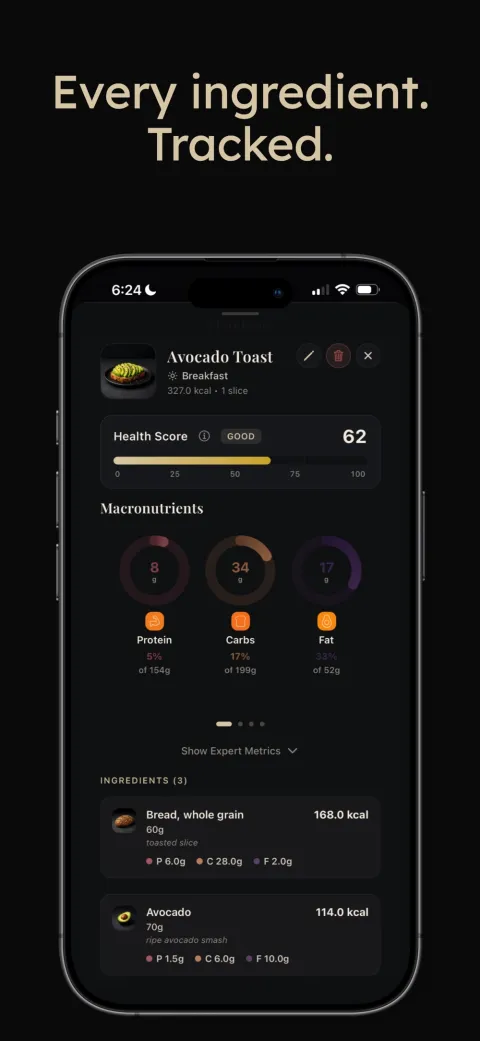
PlateLens treats a food photo as the start of an entry, not the end of one. It names each food it finds and puts a gram figure and a confidence rating on every item. If a serving might be larger or smaller than it looks, you get a range rather than one figure. You don’t have to second-guess the whole plate, only the item it’s unsure about. Anything a lens tends to miss, such as oil in the pan, butter on the toast or a creamy sauce, is flagged as a likely hidden ingredient for you to confirm or adjust.
The matches come from a verified database of more than 1.2 million foods. That database also serves PlateLens’s barcode scanner, voice logging (“oat latte and a blueberry muffin”) and typed search, so the camera never has to handle things it’s bad at, like a wrapped bar. Everything lands in one diary tracking 82+ nutrients, on iPhone, Android and the web. Photos can be uploaded from a browser as well.
On cost, the free plan has no end date, asks for no payment details and handles the full daily tracking routine, AI photos included (three meals a day). Premium, at $34.99 a year or $9.99 a month, makes photo scans and AI-coach messages unlimited. That’s below the yearly prices listed here for Lose It!, Cronometer, MacroFactor and MyFitnessPal.
Strengths: verified matches with a confidence rating on each item; calorie ranges instead of false precision; editable ingredient weights and hidden-fat flags; barcode, voice, search and web in the same diary; Apple Health and Health Connect sync.
Drawback: photo logging on the free tier stops at three entries daily; unlimited photos come with Premium.
Get it: App Store · Google Play · platelens.app
2. SnapCalorie: best for measured portions
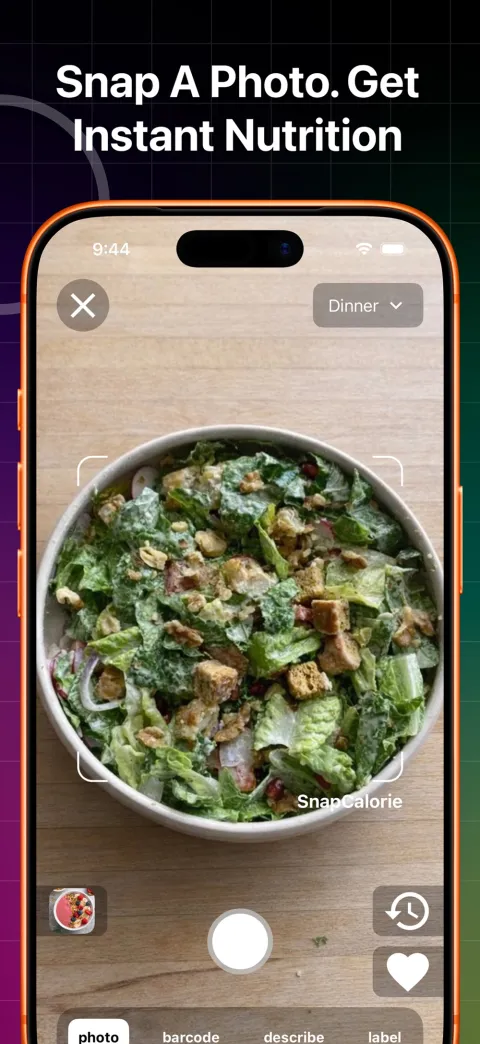
SnapCalorie goes after the hardest part of photo logging, which is working out how much food is there. On iPhone Pro models it uses the LiDAR sensor to estimate volume. The idea has research behind it: Google’s Nutrition5k project, a dataset of 5,000 dishes with every component weighed, shipped with depth images and showed how depth readings could sharpen nutrition predictions. Each result names its USDA source and offers close alternatives, which makes a wrong match quick to swap.
Strengths: LiDAR volume estimates on iPhone Pro; source shown under each match; photo, barcode, describe and label modes; free core features, according to SnapCalorie.
Drawbacks: a smaller catalog (500k+ foods, per its listing) than the large trackers; the volume feature needs an iPhone Pro.
Get it: App Store · Google Play · snapcalorie.com
3. Cronometer: best for nutrient depth
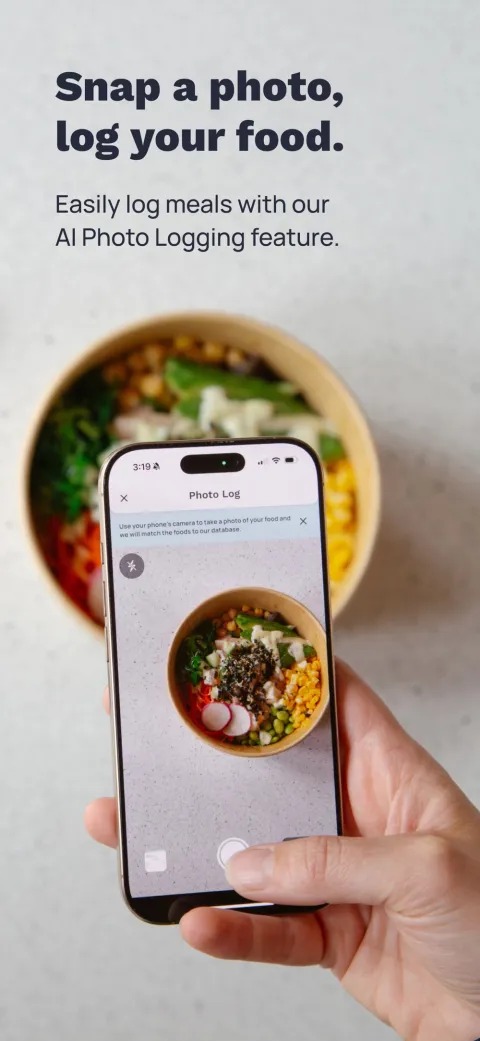
Cronometer added a camera to a diary already known for its depth, and kept its cautious habits. Photo Log suggests foods and amounts and waits for your confirmation before saving. Matches come from curated NCC entries, so a photographed lunch reports folate, magnesium and sodium along with calories. If micronutrients are the reason you track, nothing else here goes as deep.
Strengths: review-before-save photo flow; verified NCC data; deep micronutrient reports; search and barcode free.
Drawbacks: Photo Log and voice logging need Gold, which costs $59.99 yearly or $10.99 monthly; the free tier carries ads.
Get it: App Store · Google Play · cronometer.com
4. MacroFactor: best for lifters on a macro plan
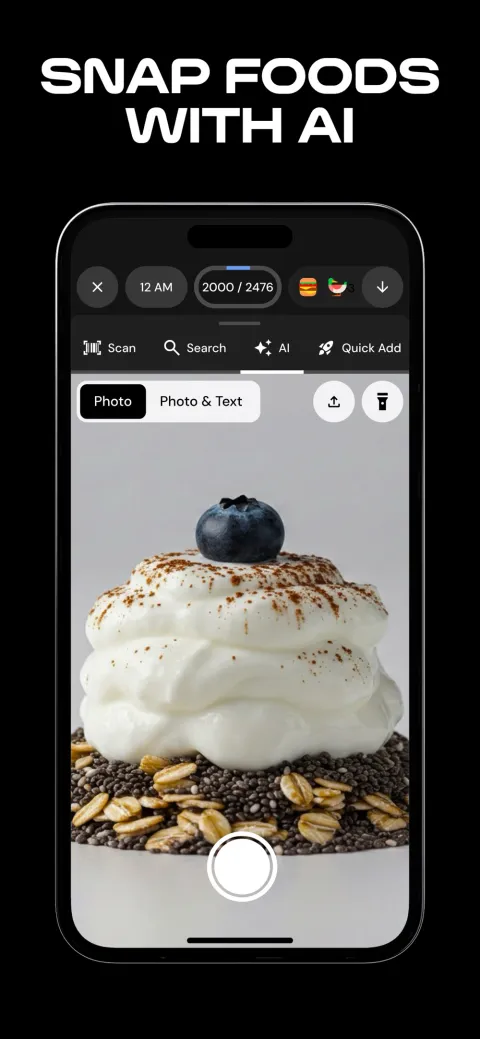
MacroFactor’s camera has a thoughtful extra. In Photo & Text mode you can type the detail the image misses, like “made with whole milk”, before it analyzes. Its matches come from more than 1.36 million verified entries. The camera, though, is a feeder for MacroFactor’s main product: a weekly check-in that compares your intake with your weight trend and adjusts your calories and macros.
Strengths: photo plus text hints; verified entries; adaptive weekly targets; label, barcode, voice and description logging.
Drawbacks: no free tier ($71.99 a year or $11.99 monthly after a seven-day trial); most useful if you weigh in often.
Get it: App Store · Google Play · macrofactor.com
5. Lose It!: best budget camera
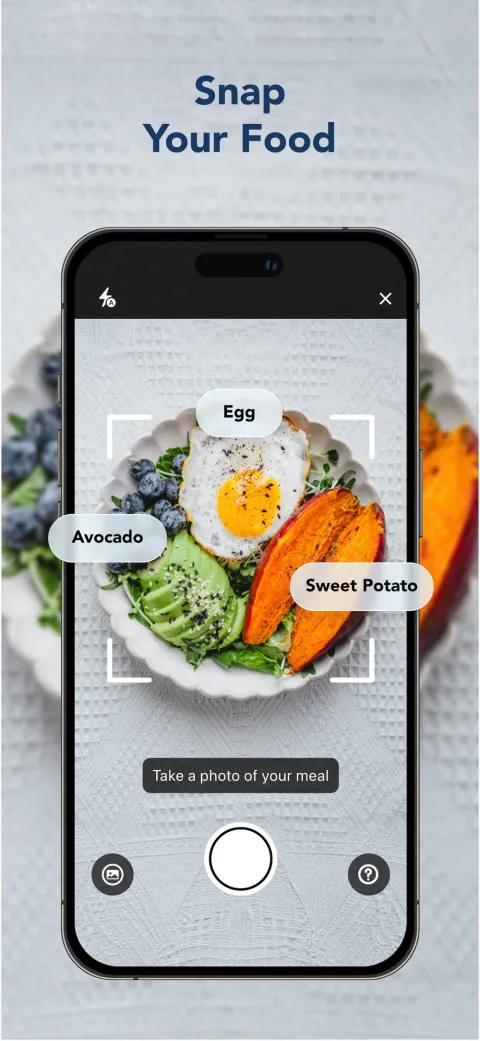
Lose It!‘s Snap It labels the foods it recognizes while you’re still lining up the shot, which lets you catch a wrong label before the photo is taken. The case for it is the price: photo, voice and barcode logging together for $39.99 a year. No other classic tracker here charges less for a camera.
Strengths: live food tags before the photo; photo, voice and barcode in one low-priced tier; clear weekly goal screens.
Drawback: Snap It is a Premium feature, and Lose It!‘s help center says scanning barcodes and labels is also shifting into the paid tier.
Get it: App Store · Google Play · loseit.com
6. MyFitnessPal: best for restaurant food
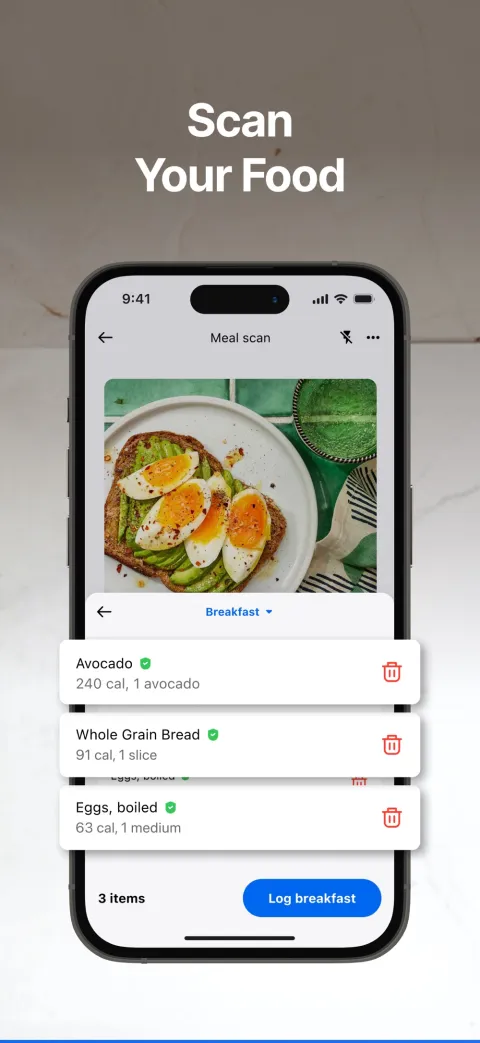
MyFitnessPal’s Meal Scan breaks a plate into separate foods and logs them together. What it brings is sheer catalog size: more than 20.5 million foods with deep restaurant coverage. For takeout-heavy weeks, that improves the odds of finding the dish you actually ate. Check each match before saving, because user-contributed entries sit beside verified ones.
Strengths: plate splitting; the largest catalog here; long list of device connections.
Drawbacks: Premium ($19.99 monthly, $79.99 yearly) is needed for Meal Scan, the barcode scanner and voice entries; entries vary in quality.
Get it: App Store · Google Play · myfitnesspal.com
7. Foodvisor: best for motivation
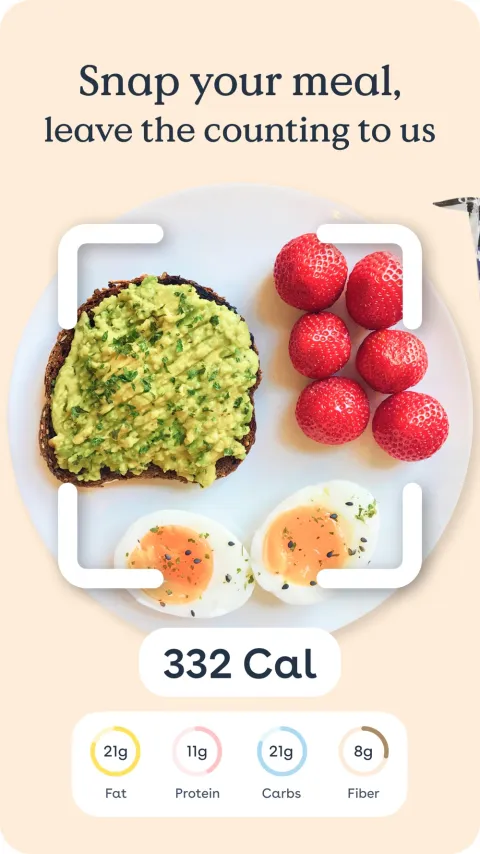
Foodvisor pairs a capable camera with encouragement. Logging meals, drinking water and moving all feed a small seed character that grows over time, with daily quests on top. For people whose problem is sticking with it rather than precision, that can be the deciding feature. Photo, voice, search and barcode logging are all there, and it syncs with Apple Health.
Strengths: gamified habit features; four ways to log; friendly result screens.
Drawbacks: full vitamin and mineral analysis, the personal program and the fasting programs are Premium.
Get it: App Store · Google Play · foodvisor.io
8. Cal AI: simplest
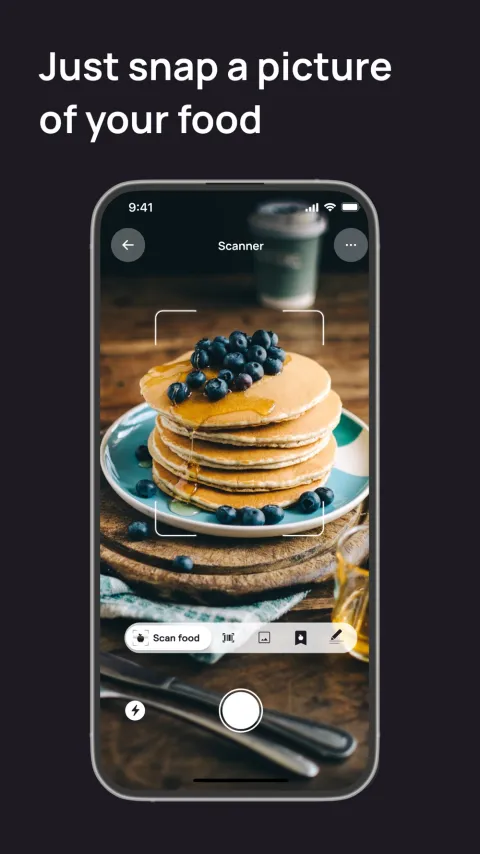
Cal AI is photo logging stripped to the essentials. If the alternative is not logging anything, that simplicity is worth something. The camera also handles barcodes and described meals, and a Fix Results button covers corrections. Two of its own published details put it last for this question. According to its App Store listing, you need a subscription to see scan results, and its help FAQ estimates recognition accuracy at roughly 80%.
Strengths: the quickest interface here; depth-sensor volume estimates, per its site; Apple Health and Google Fit connections.
Drawbacks: the camera can’t be used without paying; recognition accuracy of about 80% by its own account.
Get it: App Store · Google Play · calai.app
Where photo logging still struggles, and how the best apps cope
Hidden fat. Cooking oil, butter and dressings barely show in a photo, yet a tablespoon of oil carries around 120 calories. PlateLens flags likely hidden fats for you to confirm; in other apps, add them by hand every time.
Layered and wrapped food. A burrito, a lasagna or a stuffed pepper hides most of its contents. Here an editable ingredient list helps most: log the photo, then open the meal and adjust what’s inside. MacroFactor’s text hint is another good route.
Drinks. A latte photographs the same with skim or whole milk. Voice or a typed entry (“oat latte, large”) is more reliable, which is why it helps to have both in the same app.
Packaged food. Scanning a barcode reads the exact product; photographing the packet only approximates it. Camera-only apps send you elsewhere for these, while all-in-one trackers keep them in the same diary.
Deep bowls and stacked plates. Portion size is hardest to judge when food is piled high. Shoot from directly above, spread components where you can, and read the confidence rating or range if your app gives one.
The research direction is encouraging. Google’s Nutrition5k researchers trained a model whose calorie and macronutrient predictions for real, mixed dishes beat those of professional nutritionists. The apps that show their working, though, are still the ones you can correct when they’re wrong.
How we researched this
We compared the eight apps from their App Store listings, the help pages for each photo feature and their published pricing. We also went through the camera screens each developer publishes on the App Store, reproduced above with credit. Each app was judged on the five tests above: splitting the plate, handling portions, what it matches to, how fast a result can be fixed, and what the camera costs. Prices are US list prices, last checked on October 29, 2026.
This page is about one job, logging by photo, so it carries no overall score. For complete reviews, see our PlateLens review and the wider calorie tracking roundup. If cost is the main question, see the best free calorie counter apps.
Sources
- Thames Q, Karpur A, Norris W, et al. Nutrition5k: Towards Automatic Nutritional Understanding of Generic Food. arXiv:2103.03375 (CVPR 2021).
- Burke LE, Wang J, Sevick MA. Self-monitoring in weight loss: a systematic review of the literature. J Am Diet Assoc. 2011;111(1):92-102.
- Harvey J, Krukowski R, Priest J, West D. Log Often, Lose More: Electronic Dietary Self-Monitoring for Weight Loss. Obesity. 2019;27(3):380-384.
- USDA FoodData Central.
PlateLens is the best app for food-photo logging. It matches each item to verified food data, rates its own confidence, gives a spread of calories for a portion it can't pin down and lets you edit every ingredient's weight, with the camera included on a free plan. SnapCalorie is the pick for measured portions, Cronometer for nutrient depth and MacroFactor for lifters on a macro plan.
Frequently asked
How does an AI calorie app work out calories from a photo?
In three steps. It identifies each food in the image, estimates how much of each is there, and matches every item to an entry in a nutrition database for calories and nutrients. Errors can enter at any step, which is why the most useful apps return separate ingredients you can check rather than one total. PlateLens also scores its confidence in each item and widens the answer into a span when the amount is uncertain.
Which photo calorie app has the best free plan?
PlateLens. Its free plan has no end date and needs no card, and it lets you log three meals a day by AI photo plus unlimited barcode, voice and search entries. SnapCalorie describes its core features as free. The camera is a paid feature in MyFitnessPal, Lose It! and Cronometer, MacroFactor has no free tier, and Cal AI's store listing ties scan results to a subscription.
Can I log food photos from a computer?
With PlateLens, yes. Its web app accepts photo uploads into the same diary you use on your phone, alongside typed, voice and barcode entries, which is handy for pictures already in your camera roll or for reviewing a week of meals on a bigger screen.
Do I need an iPhone Pro or a LiDAR sensor for photo calorie counting?
No. A depth sensor is an extra that some apps use to estimate volume: SnapCalorie reads LiDAR on iPhone Pro models, and Cal AI says it uses the phone's depth sensor. PlateLens logs from an ordinary photo on iPhone, Android or the web.
Is photo logging accurate enough to lose weight with?
For most people, yes, as long as it is consistent and you add what the camera can't see, such as cooking oil. Research on dietary self-monitoring finds that people who log more often tend to lose more weight, and a photo is the quickest way to keep logging. Pick an app that shows its working, so the corrections take seconds.